
A new malware campaign is exploiting the trust employees place in Microsoft Teams and internal IT personnel, transforming routine support interactions into opportunities for malware infection.
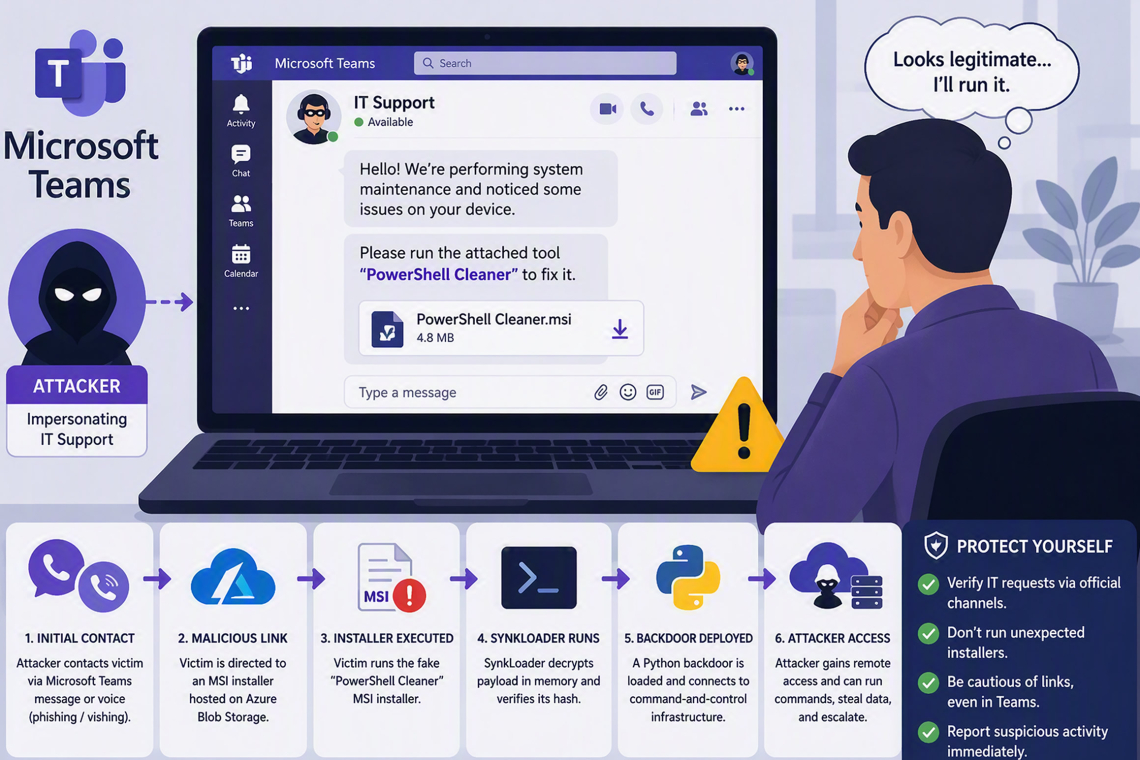
Rather than relying on software vulnerabilities, the operation uses social engineering to convince users to install a seemingly legitimate troubleshooting tool. Threat actors initiate contact through Microsoft Teams chats and voice phishing (vishing) calls, posing as corporate IT support staff and persuading victims to download a malicious MSI installer named "PowerShell Cleaner."
Researchers from ReliaQuest Threat Research identified the malware, known as SynkLoader, as a hash-validated PowerShell loader that employs sophisticated evasion techniques to conceal its true purpose from security analysts and automated detection systems.
According to findings shared with Cyber Security News (CSN), the campaign is particularly effective because it bypasses defenses that primarily focus on malicious email attachments and suspicious websites. By leveraging legitimate Azure Blob Storage infrastructure for malware distribution and executing critical functions directly in memory, attackers reduce their visibility while making the download appear trustworthy.
Impersonating IT Support to Gain Trust
The attack begins with a convincing support-themed interaction. Victims receive either a Microsoft Teams message or a phone call from someone claiming to be an internal IT representative. The attacker typically presents the MSI installer as a diagnostic, cleanup, or repair utility intended to resolve a technical issue.
This tactic closely resembles previous helpdesk impersonation campaigns that successfully exploited employees' willingness to cooperate with support personnel.
Targets are directed to download an installer hosted within Azure Blob Storage, a legitimate cloud service frequently used by organizations. While the platform itself is not malicious, its trusted reputation can make suspicious downloads appear more credible.
Whether the attack starts through a Teams conversation or a vishing call, both methods ultimately steer the victim toward the same malicious installer. This approach is particularly dangerous because employees are often conditioned to scrutinize email links while viewing collaboration platforms such as Teams as inherently trustworthy environments.
Recent incidents have demonstrated that even a brief support-related interaction can quickly escalate into a successful compromise when attackers create a sense of urgency and offer what appears to be a straightforward solution.
SynkLoader Conceals Its Malicious Activity
Once executed, SynkLoader decrypts its payload directly in memory and validates the file against a cryptographic hash before execution. If the payload has been modified, corrupted, or improperly extracted, the malware silently terminates.
This validation mechanism helps evade automated security analysis, as many sandbox environments may be unable to trigger the complete infection process.
Following successful execution, the loader deploys a Python-based backdoor that retrieves additional capabilities from command-and-control (C2) infrastructure only when required. By keeping critical functionality outside the initial payload, attackers minimize the information available through static analysis and can make the malware appear inactive when C2 servers are unreachable.
The technique reflects a broader trend in cybercrime where threat actors increasingly leverage PowerShell and Python to execute malicious code while leaving behind fewer traditional indicators of compromise. As a result, unusual scripting activity should be viewed as a potential warning sign rather than dismissed as routine administrative behavior.
Challenges for Security Teams
The campaign creates significant investigative challenges because malware components may appear incomplete or harmless when analysts cannot replicate the precise conditions required for execution.
Security teams are advised to retain suspicious installers, preserve process and network telemetry, and conduct broader threat-hunting activities rather than closing alerts based on a single unsuccessful execution attempt.
Given the growing use of PowerShell and Python-based attack chains, defenders should closely monitor both scripting environments during incident response efforts. Failure to recognize activity in either platform could allow critical evidence to be overlooked.
Defensive Recommendations
Organizations can reduce the risk posed by SynkLoader and similar campaigns by:
- Restricting unnecessary external Microsoft Teams communications.
- Requiring employees to independently verify unexpected IT support requests through established channels.
- Monitoring MSI installers launched from user-controlled directories.
- Investigating downloads originating from cloud-storage services.
- Detecting unusual PowerShell and Python execution activity.
- Isolating and examining any endpoint that has run a suspicious installer.
- Searching for follow-on payloads and command-and-control communications.
Key Takeaway
The SynkLoader campaign demonstrates that trusted collaboration platforms and familiar IT support narratives can be effectively weaponized by threat actors. Employees should never assume that a download is safe simply because it originates from Microsoft Teams or appears to come from support personnel. Independent verification before installation remains one of the most effective defenses against social engineering-driven malware attacks.
Found this article interesting? Follow us on X(Twitter) ,Threads and FaceBook to read more exclusive content we post.
