
Google has introduced a major upgrade to Chrome’s Enhanced Protection mode, integrating a more advanced Gemini AI model designed to identify fraudulent antivirus warnings, fake browser update prompts, and other scam-related websites. The update, announced on October 20, 2026, also adds new safeguards against deceptive websites and ClickFix-style attacks that trick users into executing malicious commands.
Smarter Scam Detection Powered by Gemini
The latest enhancement builds upon Google's ongoing efforts to use artificial intelligence to combat online fraud. While earlier versions of Chrome relied on an on-device Gemini model to detect tech-support scams on supported hardware, the company has now shifted the analysis to a cloud-based system.

This move allows scam detection capabilities to become available to all users who enable Enhanced Protection, rather than being restricted to devices capable of running AI models locally.
How Chrome Uses Gemini to Identify Scam Websites
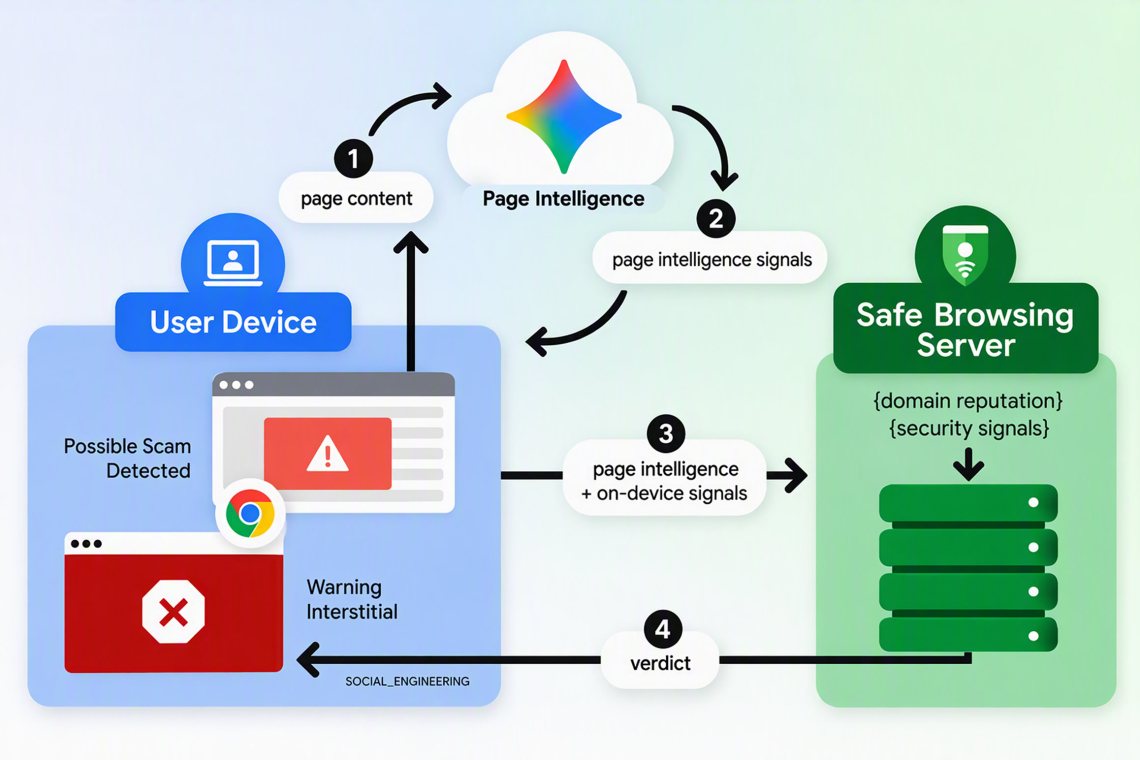
Gemini analyzes webpage content to determine whether a site exhibits characteristics commonly associated with online scams. The model evaluates factors such as:
- The brand or organization the website claims to represent
- The apparent purpose of the webpage
- The language and tactics used to influence visitors
- Indicators commonly found in fraudulent security warnings
The AI then generates a risk assessment score indicating how likely the page is to be deceptive.
However, Gemini does not independently determine whether a website should be blocked. Chrome’s Safe Browsing system combines Gemini’s findings with additional security signals, including domain reputation, threat intelligence, and historical abuse data before issuing a final verdict.
This layered approach helps identify sophisticated scams that imitate legitimate browser alerts, antivirus notifications, or security-related warnings designed to pressure users into taking unsafe actions.
Privacy Protections Built Into the System
Google states that webpage content is only sent for AI analysis when Chrome detects strong indicators of potentially fraudulent activity.
According to the company, this information is:
- Processed temporarily
- Not stored permanently
- Not logged for future use
- Not used to train AI models
These privacy measures apply specifically to the content analyzed as part of the scam-detection process.
New Suspicious Website Warnings
Chrome is also expanding its warning system by introducing a new category of alerts for users enrolled in Enhanced Protection.
The browser will now display Suspicious Site Warnings when Google detects potentially deceptive behavior but does not have enough evidence to classify the site as definitively malicious.
These warnings feature:
- Distinct colors and visual indicators
- Different wording from standard malware alerts
- Separate icons and layouts to distinguish risk levels
Meanwhile, websites confirmed to be dangerous will continue to trigger Chrome’s traditional full-page red warning screen.
This two-tier approach allows users to receive earlier notice about potentially harmful sites while clearly differentiating between suspected and confirmed threats.
Enhanced Defenses Against ClickFix Attacks
The update also targets the growing threat of ClickFix campaigns, a social-engineering technique increasingly used by cybercriminals.
In these attacks, users are shown fake error messages or security alerts claiming that a browser, system component, or application requires manual repair. Victims are instructed to copy and execute commands, often through:
- PowerShell
- Command Prompt (cmd.exe)
- Terminal environments
Because malware downloads occur outside of Chrome’s standard download process, traditional browser-based protections often struggle to detect such attacks.

To address this, Chrome now monitors commands copied during suspected ClickFix scenarios. Before any data is submitted for review, personally identifiable information is stripped from the copied content.
If Safe Browsing determines the command is dangerous, Chrome displays a warning to stop users from executing potentially malicious instructions. Google says the detection mechanism has been engineered to minimize interference with legitimate development and administrative workflows.
Users Must Enable Enhanced Protection
The new Gemini-driven security features are available exclusively to users who enable Enhanced Protection within Chrome’s Safe Browsing settings.
Google also emphasized an important security reminder: Chrome will never ask users to troubleshoot, repair, or update the browser by copying and running commands from a webpage.
Key Takeaway
With this update, Google is significantly expanding Chrome’s ability to identify sophisticated online scams. By combining Gemini AI with Safe Browsing intelligence, the browser can better detect fake antivirus alerts, fraudulent browser updates, and social-engineering attacks such as ClickFix, giving users stronger protection against increasingly convincing cyber threats.
Found this article interesting? Follow us on X(Twitter) ,Threads and FaceBook to read more exclusive content we post.
